
Sporting Schools
The program helps schools increase children's sport participation
| Product | Responsibility |
|---|---|
| Sporting Schools | End-to-end product design |
| Duration | Year |
|---|---|
| 12 Months | Jul 2022 to Jul 2023 |
| My Role | Team |
|---|---|
| Senior Product Designer | 1 Product Owner, 1 Project Manager, 2 Business Analysts, 2 Developers, 2 Quality Assurance Specialists |
Problem statement
Sporting Schools is an Australian Government initiative. The initiative connects more than 8,000 primary and secondary schools with sport programs and grants. More than 25,000 teachers and 1,500 sporting organisations used the platform. The platform ran on old SaaS infrastructure. This infrastructure no longer fit the needs of the program.
The Australian Sports Commission funded a full rebuild on Microsoft Dynamics and PowerApps Portals. My role was to design the new platform end-to-end.
Over the years, the existing platform gained many usability problems:
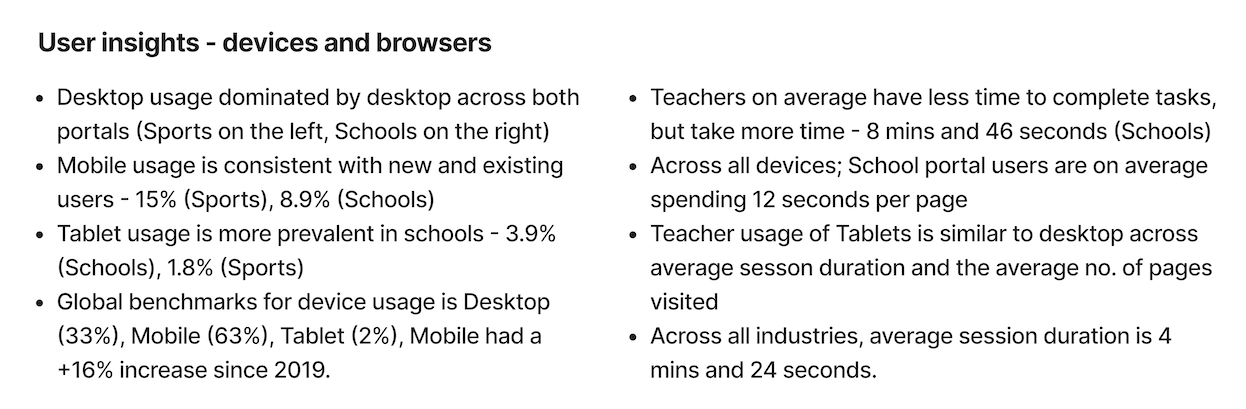
- 60% of users used a mobile device or tablet, but the platform ran on desktop only.
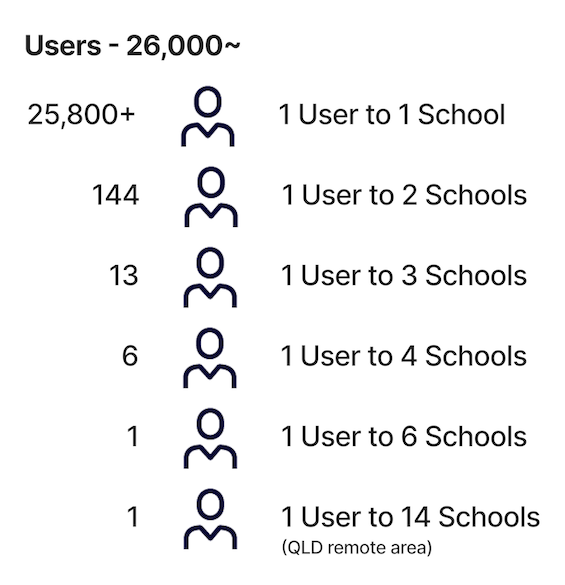
- Navigation served the 2% of users who work with multiple schools. This design created extra complexity for the other 98%.
- Grant cycles happen every quarter. This schedule caused long gaps between logins. The platform had no self-serve credential recovery.
- Schools needed principal approval before they applied for grants. This requirement created bottlenecks.
- The platform did not serve smaller and specialist schools.
Design process
Before this project, the program never used a designer. One lead developer built and maintained the platform. The developer never needed to justify design decisions.
Early in the project, my "why" questions created some friction. But the lead developer had experience and was open to new approaches.
I worked closely with the lead developer and the product owner. Together, we moved design ownership into my role. We built a strong foundation for collaboration.
Understanding the current state:
I started with the current state. I mapped the existing information architecture, user flows, and usability problems. A user matrix helped the team see who we designed for. The matrix also showed where the platform failed these users.

Responsive-first design:
Google Analytics confirmed a fact that the old platform ignored: 60% of users used a mobile device or tablet.
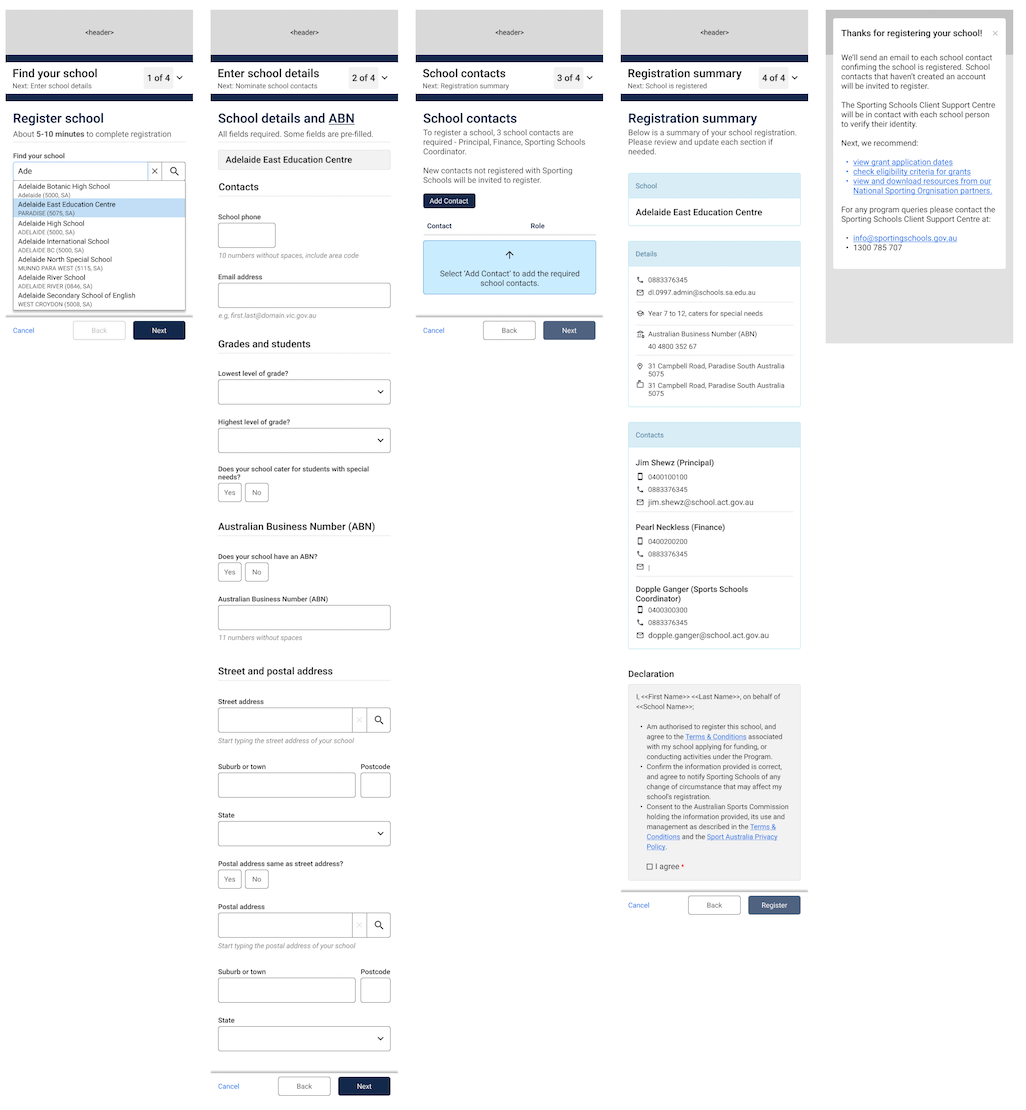
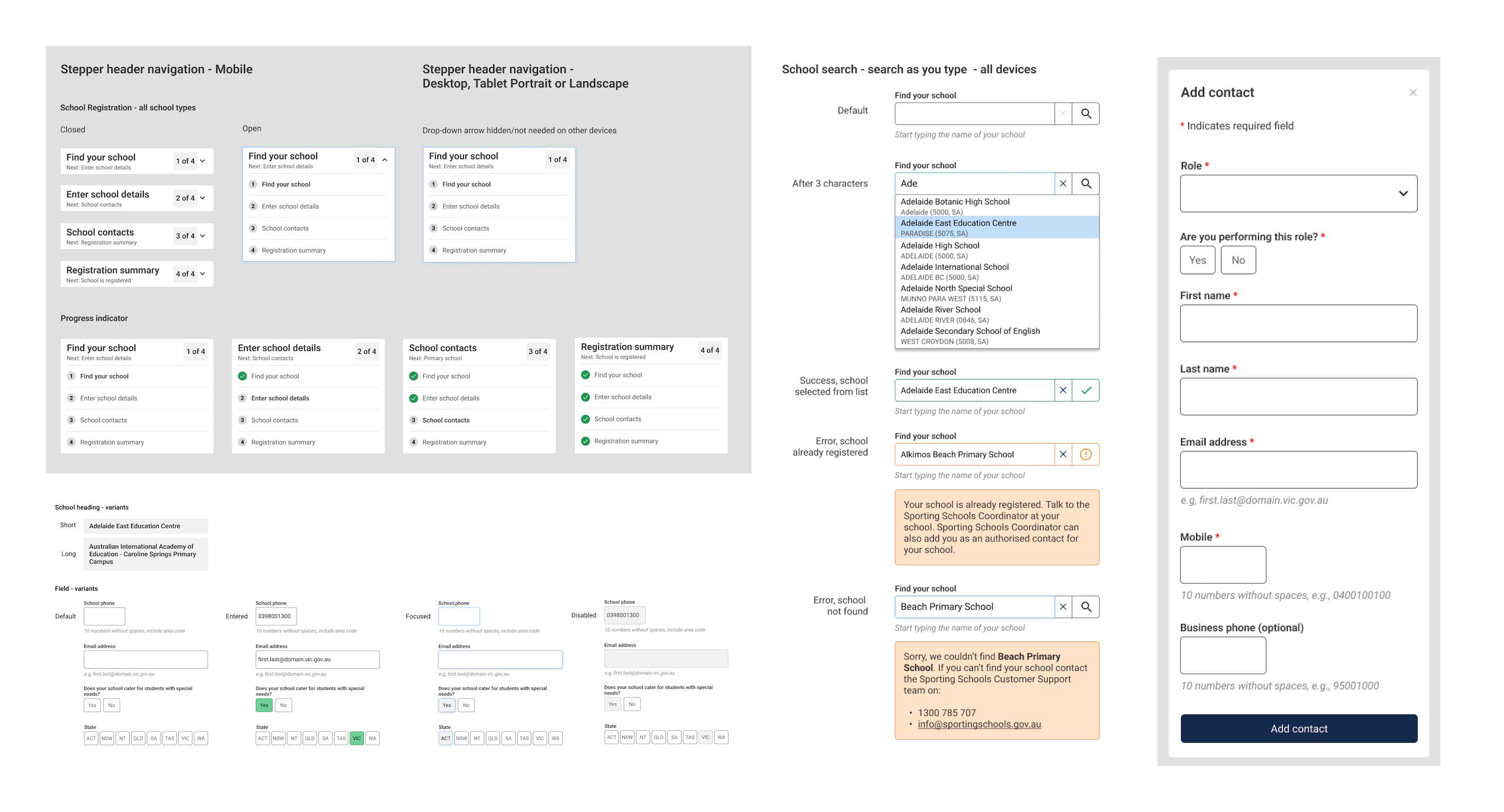
The new platform used Bootstrap through Microsoft PowerApps Portals. Because of this, I recommended a responsive design from the start. This choice removed the need for a separate mobile build.
Microsoft B2C authentication:
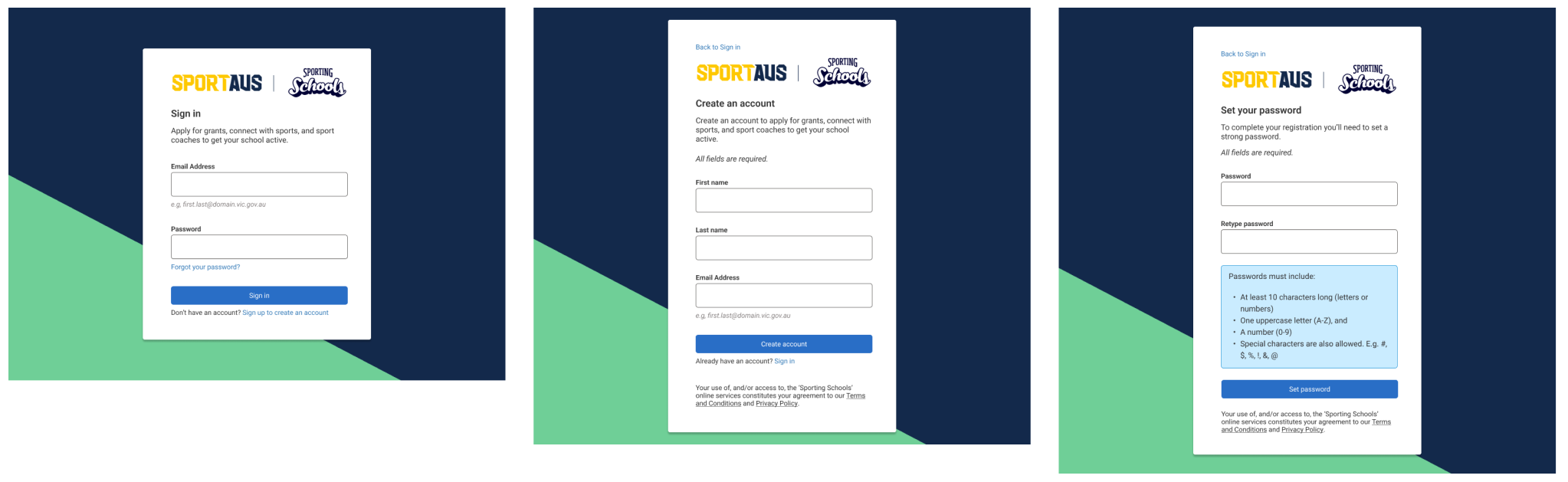
The move to Microsoft B2C was a priority for the IT team. But the platform had important UX constraints. These constraints limited control over layouts, form fields, error messages, and button styles.
I met with the Lead Designer from another team. This team already used B2C. I asked about the boundaries of the system. I then designed two options for each core flow: sign in, sign up, and forgot or reset password.
After stakeholder review and approval, I worked with the business analyst to write user stories for development.
Sprint delivery:
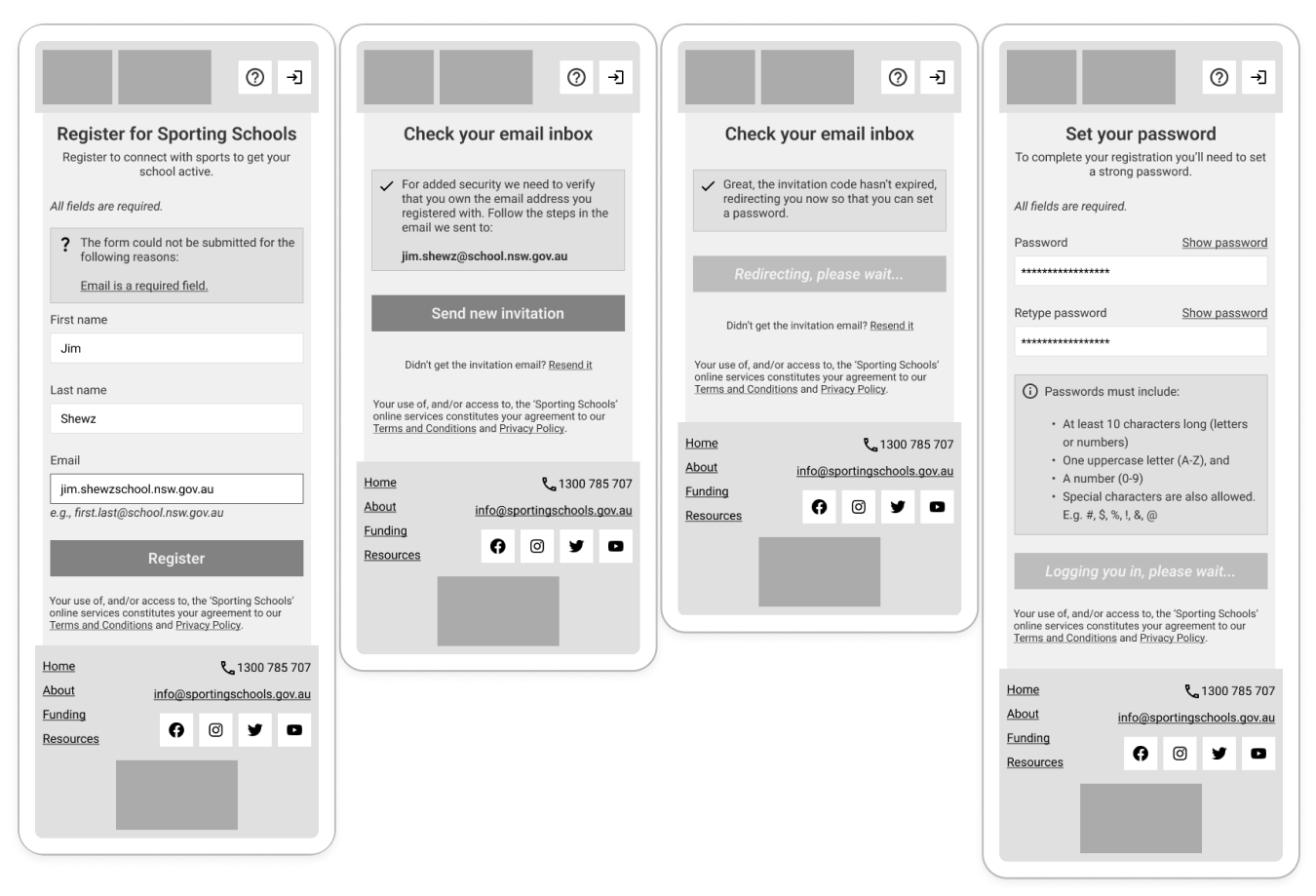
I worked in two-week sprints. I designed all screens, flows, states, and components for the platform. I worked with business analysts, developers, QA testers, and the product owner throughout the project. I also examined each release in the test environment against the design specs.
Usability testing:
By February 2023, the build was stable enough to test. I planned and ran moderated usability sessions with real teachers. I defined the scenarios and tasks. I recruited the participants. I scored the results with the Single Ease Question for each task and the System Usability Scale for each session.
I watched every session again. I then produced a findings report, a presentation, and a roadmap of priority actions. I presented the findings to the product team and Sporting Schools stakeholders. I then wrote the agreed actions as user stories to finish the project.

Outcomes
By late May 2023, 8,000 schools had access to a fully rebuilt Sporting Schools platform. The platform worked well across all devices. The platform met WCAG 2.1 AA standards. Usability testing with real users confirmed the platform worked well.
Learnings
This project changed how I think about UX. It showed me how to bring UX into an environment that never had it before.
- First-designer problems are real, and teams can solve them. It takes patience to bring design rigor into an established team. Experienced developers often become strong allies once the team builds trust.
- Data drives decisions. Analytics that showed 60% mobile usage made the case for responsive design.
- Constraints are not blockers. The limits of Microsoft B2C pushed me toward clearer and more creative solutions.
- Usability testing can feel uncomfortable. When you watch real users struggle, you gain a powerful tool. This tool can change assumptions.
- Consistency compounds over time. Users noticed and valued familiar UI patterns across screens. This is a small detail, but it has a large effect on trust.